Chrome extension for support, QA, devs and PMs
One screenshot shouldn't leak a customer's email, card or API key.
Blur Text masks personal data on the page itself. Turn it on, then capture, record or screen share with any tool. What you share is already clean.
- No account
- No servers, no analytics
- Nothing leaves your browser
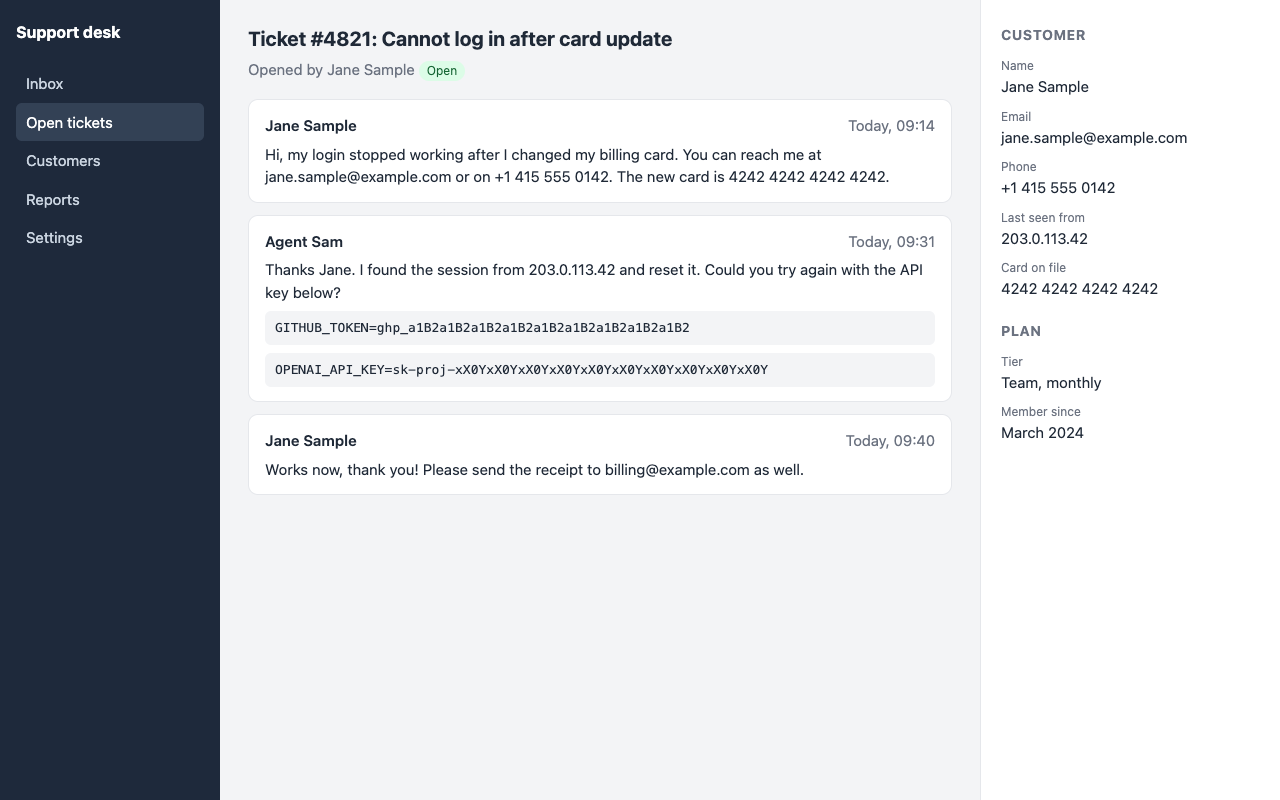
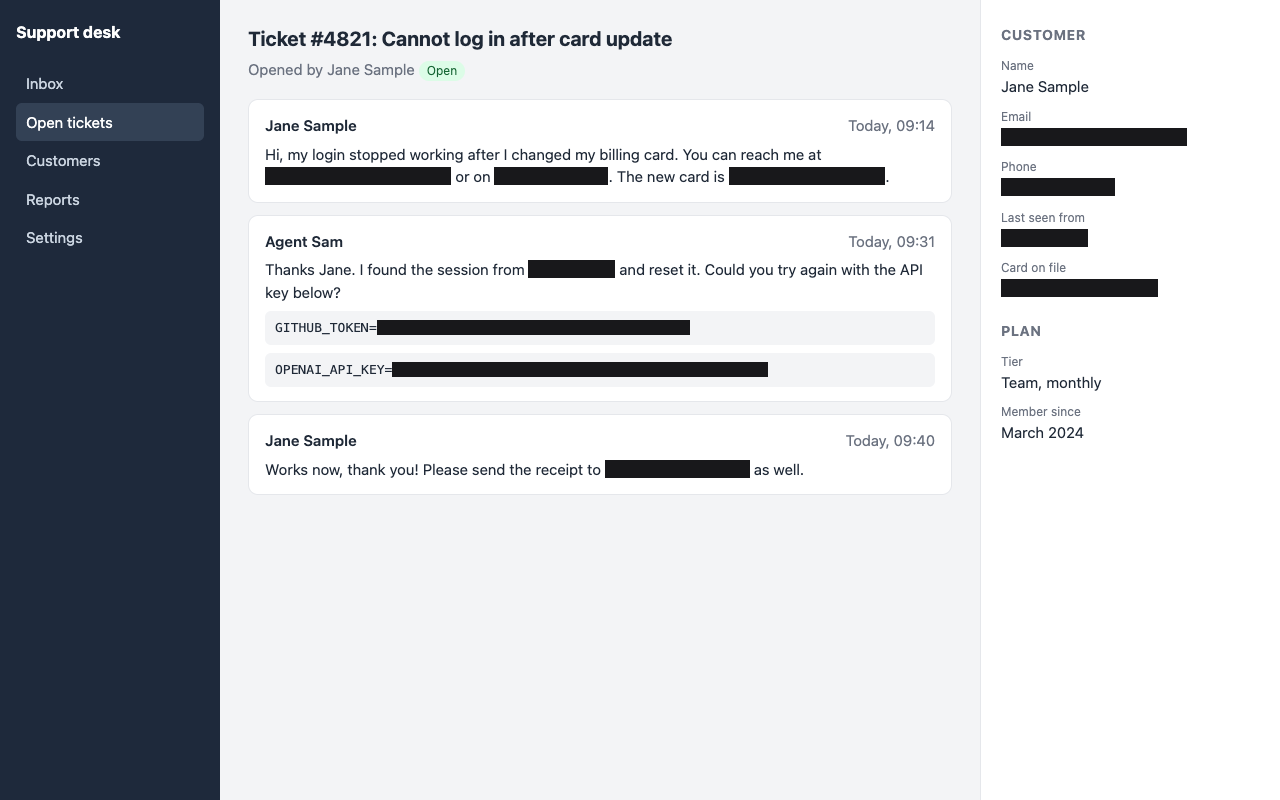
Try the switch. Same page, same screenshot tool, very different result.
It takes one missed email to ruin your day
Tickets and docs
A "quick" screenshot in Jira, Slack or Notion often carries a customer's name, email and phone with it.
Demos and calls
Switching tabs mid-share is when an inbox, an admin panel or a .env file flashes on everyone's screen.
Bug reports and recordings
Videos and screenshots get forwarded, indexed and kept for years. Secrets in them stay there too.
Clean by default, whatever you capture with
The masking happens in the page, not in a screenshot tool, so it works with all of them.
Privacy mode in one click
Press Alt+Shift+P or use the toolbar button. Matches are covered with solid blocks right away. Original glyphs are hidden completely, not just blurred.
Works with any capture tool
System screenshots, Loom, Zoom, Meet, Teams, OBS. If it can see your tab, it sees the masked version.
Keeps up with live pages
Dashboards, SPAs and infinite scroll are handled. New content is masked automatically, and the tab title too.
Always on for your sites
Use it for this tab only, or switch it on every time you open your admin panel, CRM or helpdesk.
Missed something? Click it
Pick any element and hide it by hand. Click a mask to reveal it again.
Capture and edit
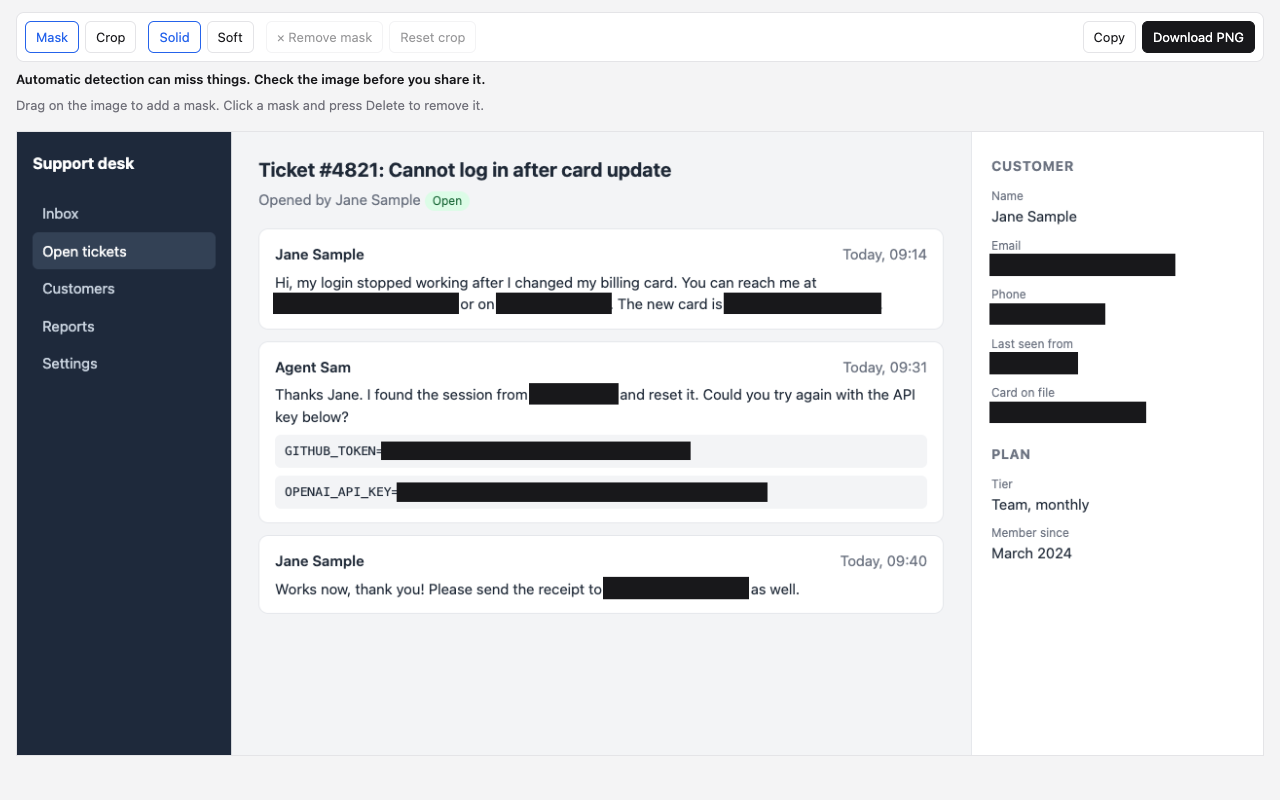
Press Alt+Shift+S to grab the tab. Auto masks are already in place. Add, remove, crop, then copy or download the PNG.
Three steps, ten seconds
- Turn it on. Toolbar button or Alt+Shift+P, before you start sharing.
- Share or capture as usual. Emails, phones, IPs, card numbers and API keys are already covered.
- Glance, then send. Automatic detection can miss things, so take one second to check.
What it finds
- Email addresses
- Phone numbers, international
- IPv4 and IPv6
- Card numbers, Luhn-checked
- API keys and tokens
- JWTs
- Text in input fields
Every category can be switched on or off in the options page.
Built so your data can't leak from the tool that protects it
Zero network requests
Blur Text has no backend and makes no requests of its own. Page content never leaves your device.
No account, no tracking
No sign-up, no analytics, no ads. Settings sit in your own Chrome sync storage.
Access only where you allow it
Chrome asks you before Blur Text runs on a site, one site at a time. No blanket access at install.
Screenshots stay put
Captures stay in the browser and are removed from extension storage as soon as the editor opens.
FAQ
Is it really free?
Yes. Install it, use it, no account needed.
Is the text actually hidden, or just blurred?
The original text is covered by an opaque block, so it can't be recovered from the pixels. A blurred look is available as a style, but it sits on top of fully hidden text.
Can it miss something?
Yes. Detection is automatic and can miss things, so always check the page or the screenshot before you share. Blur Text doesn't promise perfect protection, it removes the most common leaks and the manual work.
Can I turn on privacy mode after I've started sharing?
You can, but whatever was on screen before that moment was already visible. Turn it on first.
What doesn't it cover?
Content drawn on a canvas, such as Google Docs, Google Sheets or Figma, and text inside images are not detected. Embedded frames from other sites and shadow DOM may not be masked, and screenshots auto-mask the main page only. Chrome internal pages and the Chrome Web Store are closed to all extensions.
Can the hidden text still be found?
Masking is visual. The original text stays in the page, so Ctrl+F, copy and paste, tooltips and browser autofill can still reveal it. The pixels you share are what's protected.
Which permissions does it need?
Chrome asks for access to a site only when you turn privacy mode on there, one site at a time. There is no access to all sites at install.

Share your screen without the sweat
Add Blur Text to Chrome and make clean screenshots the default.
Free. No account. Installs from the Chrome Web Store.